Recent Security Bulletins
August 19, 2026
Critical GitLab Vulnerability Requires Patching
Who is affected?
-
Developers or system administrators hosting a self-managed GitLab instance.
What You Need to Know
-
GitLab has patched two vulnerabilities in GitLab Community and Enterprise including one critical defect which allows attackers to modify or delete user data and public projects.
-
Immediate patching to versions 18.11.11, 19.0.8, 19.1.6, and 19.2.4 is required.
Why it matters
-
By leveraging this weakness, attackers could modify or delete user data and public projects via a GraphQL directive without authentication.
-
The patches also address issues related to a cross-site request forgery (CSRF) vulnerability impacting the GraphQL multiplex query handler.
Go deeper
-
Additional details can be found in this news article, as well as in this official GitLab patch announcement.
The Office of Information Technology (OIT) Information Security team requires all GitLab installations running an impacted version to be upgraded to the latest version as soon as possible.
June 30, 2026
High Severity GitLab Vulnerabilities Require Patching
Who is affected?
-
Developers or system administrators hosting a self-managed GitLab instance.
What You Need to Know
-
GitLab has patched several vulnerabilities in GitLab Community and Enterprise including code execution and information disclosure bugs.
-
Immediate patching to versions 19.1.1, 19.0.3, and 18.11.6 is required.
Why it matters
-
By leveraging these weaknesses, attackers could execute JavaScript code in users’ browser sessions.
-
The patches also address issues related to authenticated users’ access as well.
Go deeper
-
Additional details can be found in this news article, as well as in this official GitLab patch announcement.
The Office of Information Technology (OIT) Information Security team requires all GitLab installations running an impacted version to be upgraded to the latest version as soon as possible.
April 20, 2026
Keep these common signs of phishing in mind
Office of Information Technology logs show a recent uptick in aggressive phishing messages that have initially made it through University email filters. These messages have targeted students with imposter bursar notices and job scams, and have gone to students and employees with fake Okta account alerts.
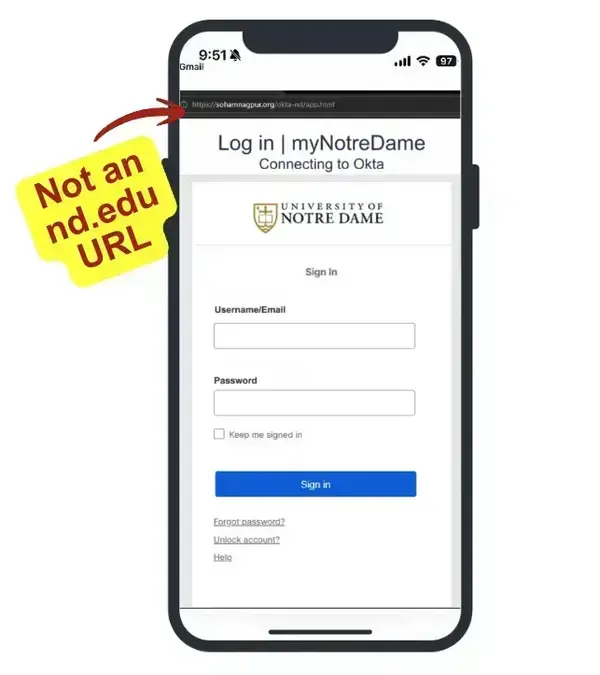
These recent phishing attacks have a few things in common:
- Creating a sense of urgency with “account on hold” or “balance owed” threats
- Lack of personalization or University branding
- Unexpected links that take you to malicious non-ND sites to capture your credentials
- Job offers using Google Forms to collect personal information
The flags listed above are only a few of the common signs of phishing to look out for when reading any message that hits your inbox. By taking a few minutes to look at the finer details of unsolicited emails and reporting anything suspicious, you could be helping to protect yourself and the University from vulnerability.
If you clicked the link in any of these emails and entered credentials into the malicious site, please contact the Service Desk right away to reset your password.
Additional Resources:
- Need help spotting the common signs of phishing? We have some helpful reminders for you.
- Remember to always report suspicious emails.
- Use 1Password to store and manage credentials. Bonus: it won’t automatically fill your password in on a phishing site!
March 16, 2026
Chrome High-Severity Vulnerabilities Require Patching
Google has released security updates to its Chrome web browser to fix high-severity vulnerabilities actively being exploited. This update also applies to any web browsers running the same technology (i.e., Microsoft Edge, Brave, Opera, Vivaldi and others).
The Office of Information Technology (OIT) Information Security team recommends updating all affected browsers on both personal and University owned devices. Most University managed computers have automatic updates enabled for Google Chrome—restart your Chrome browser to allow it to update to the latest release.
Instructions for manually updating your Chrome browser are available in this Google Chrome Help web page. If you are using a different web browser, please refer to their support documentation.
While these security updates are specific to Chromium-based web browsers, please ensure security updates are applied regularly for all web browsers.
February 16, 2026
Chrome High-Severity Vulnerability Requires Patching
Google has released security updates to its Chrome web browser to fix a high-severity vulnerability actively being exploited. This update also applies to any web browsers running the same technology (i.e., Microsoft Edge, Brave, Opera, Vivaldi and others).
The Office of Information Technology (OIT) Information Security team recommends updating all affected browsers on both personal and University owned devices. Most University managed computers have automatic updates enabled for Google Chrome—restart your Chrome browser to allow it to update to the latest release.
Instructions for manually updating your Chrome browser are available in this Google Chrome Help web page. If you are using a different web browser, please refer to their support documentation.
While these security updates are specific to Chromium-based web browsers, please ensure security updates are applied regularly for all web browsers.